How to Tell If an Email Is a Scam (7 Warning Signs)
Updated November 17, 2026 | Reading time: approximately 8 minutes
You open your email and see a message that appears to be from your bank. It says there’s a problem with your account and you must click a link immediately.
Is it real, or is someone trying to steal your information?
Knowing how to tell if an email is a scam can help protect your money, passwords, and personal information.
Scam emails have become more convincing. Some use professional-looking logos, familiar company names, and carefully written messages that appear legitimate.
The good news is that there are warning signs you can look for before clicking anything.
In this beginner-friendly guide, you’ll learn seven common signs of email scams, how to check suspicious messages safely, and what to do if you’ve already clicked a scam link.
Table of Contents
What Is an Email Scam?
An email scam is a message designed to trick you into giving away money, personal information, or access to your accounts.
One common type is called phishing.
Phishing emails often pretend to come from organizations you recognize, including:
- Banks and credit card companies
- Amazon and other online stores
- PayPal and payment services
- Netflix and other streaming services
- Delivery companies
- Government agencies
- Friends, family members, or coworkers
A scammer might claim your account has been locked, a package couldn’t be delivered, or you owe an unexpected payment.
The goal is usually to get you to click a dangerous link, open an attachment, send money, or reveal private information.
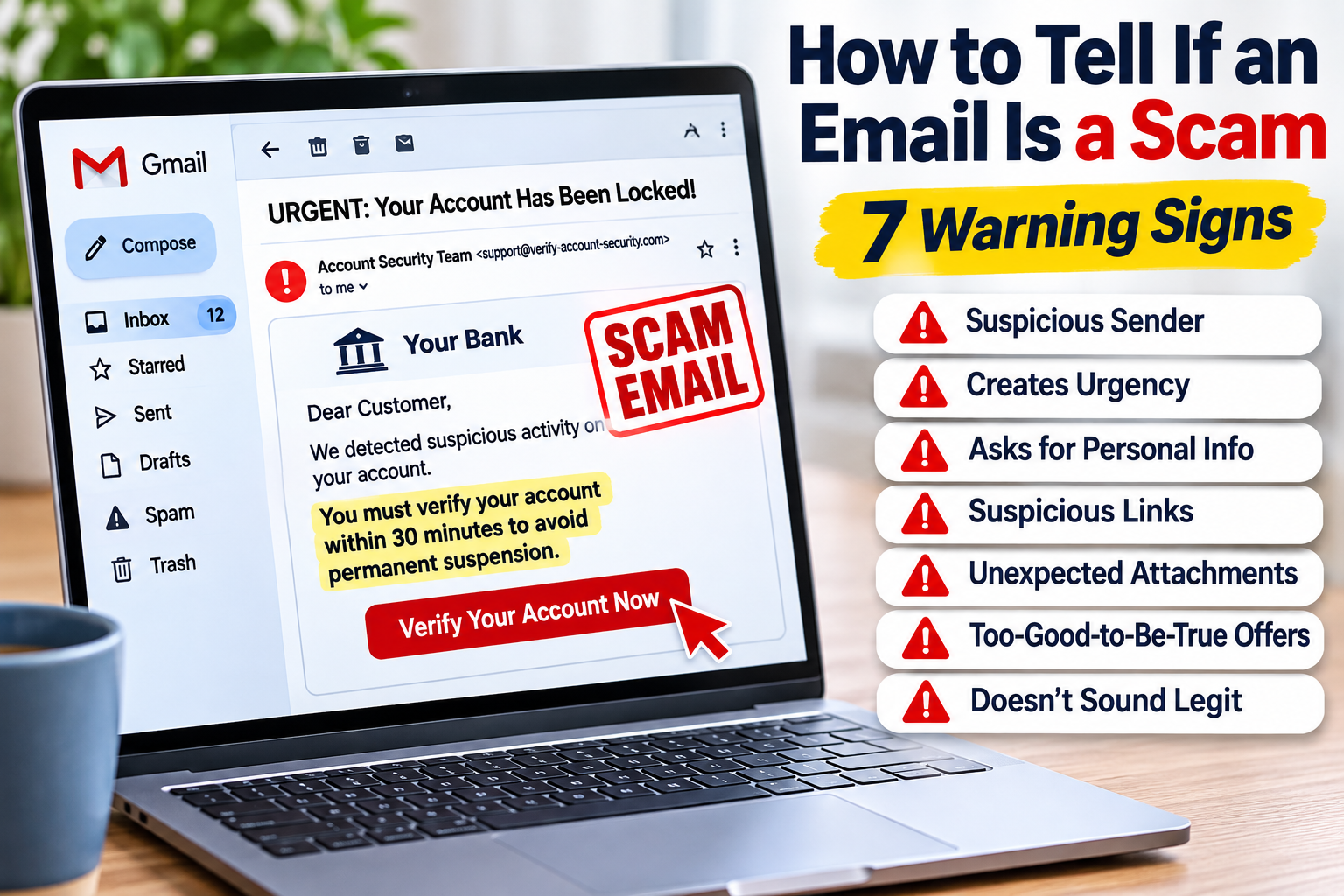
How to Tell If an Email Is a Scam: 7 Warning Signs
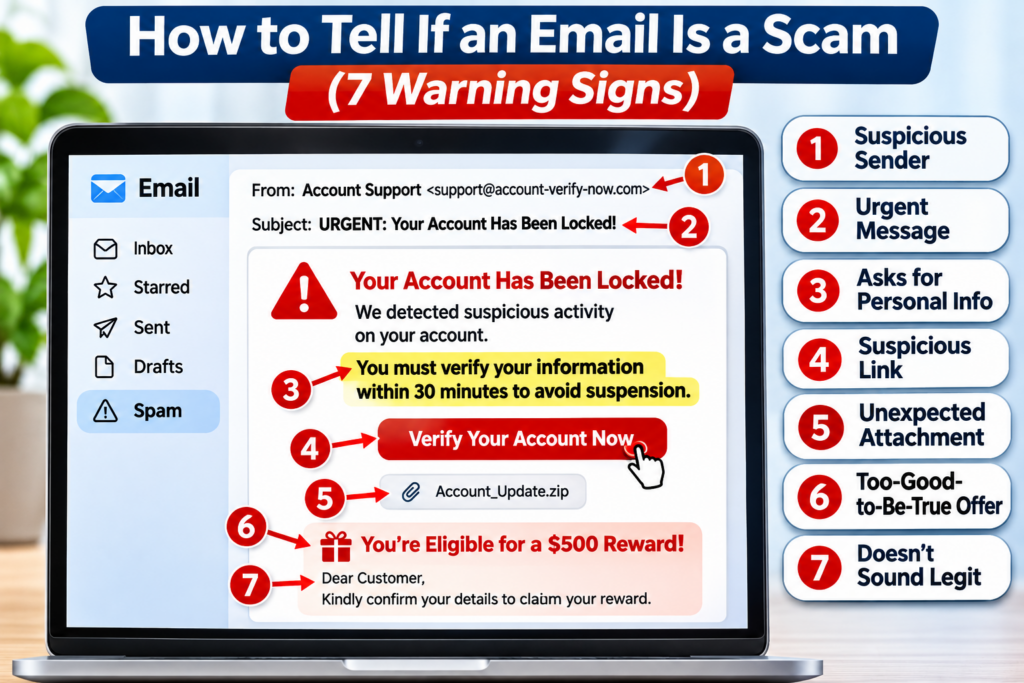
1. The Sender’s Email Address Looks Suspicious
One of the first things to check is the sender’s actual email address.
A message might display a familiar company name while coming from an unrelated address.
For example:
Displayed name: Customer Support
Email address: support@account-verification-example.com
The sender’s name may look reassuring, but that doesn’t prove the email is genuine.
What to do:
- Open the sender details in your email app.
- Look at the complete email address.
- Check for misspelled company names or unfamiliar domains.
- If you’re unsure, contact the company through its official website.
Remember that scammers can also forge sender information. Even a familiar-looking address isn’t absolute proof that an email is safe.
2. The Email Creates a False Sense of Urgency
Scammers often want you to react before you have time to think.
You might receive a message saying:
Example scam message:
“Your account will be permanently suspended in 30 minutes. Verify your identity immediately.”
Other examples include:
- Your bank account will be frozen.
- Your package will be returned today.
- Your payment has failed.
- Your computer has been infected.
- Someone has accessed your account.
These claims are designed to make you feel worried or frightened.
What to do:
Don’t rush. Open the company’s official app or type its known website address into your browser to check whether there’s a real problem.
3. The Email Asks for Passwords or Personal Information
Be especially cautious when an unexpected email asks you to provide sensitive information.
Examples include:
- Your email password
- Your bank account number
- Your Social Security number
- Your credit card details
- A one-time security code
A scammer may claim this information is necessary to verify your account.
Example scam message:
“We noticed suspicious activity. Reply with your password and verification code to protect your account.”
What to do:
Never send passwords or security codes in response to an unexpected email.
If you think an account needs attention, visit its official website or app directly.
4. The Email Contains a Suspicious Link
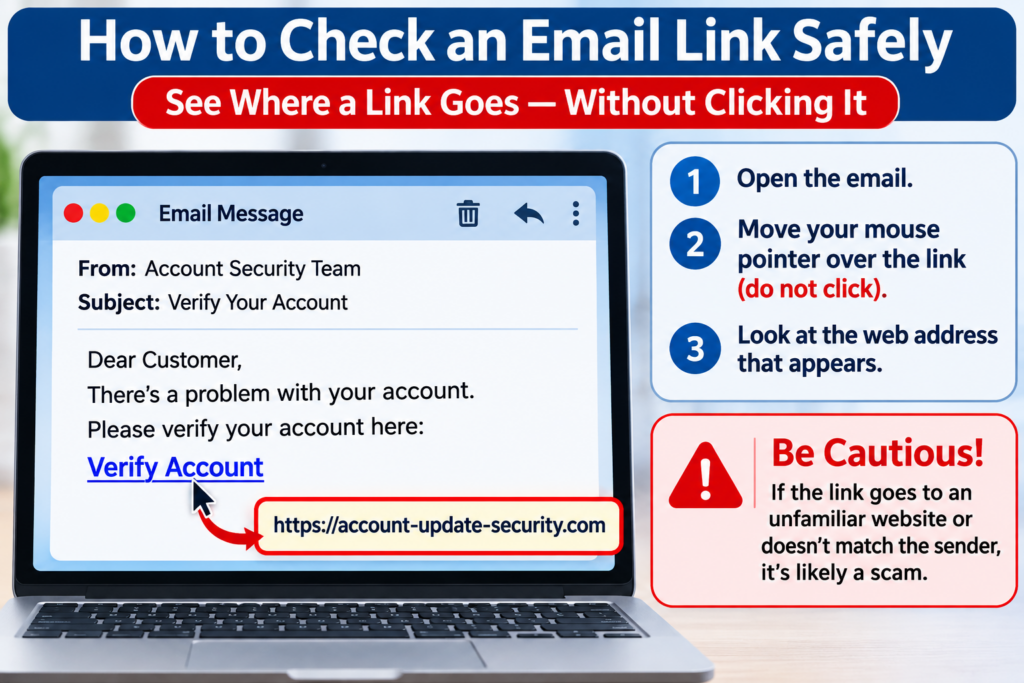
A scam email may contain a button that says:
- Verify Account
- Track Your Package
- Claim Your Refund
- Update Payment Information
- Confirm Your Identity
The button may lead to a fake website designed to look like a legitimate company.
How to check a link without clicking:
On a computer, move your mouse pointer over the link without pressing the mouse button. Your browser or email program may display the destination.
Look for unusual spelling, unexpected domains, or addresses unrelated to the supposed sender.
For example, a link claiming to be for your bank shouldn’t lead to an unfamiliar website.
On a phone, don’t tap a suspicious link just to investigate it. Instead, open the company’s official app or enter its known website address yourself.
Important: A padlock symbol or an address beginning with HTTPS does not guarantee a website is legitimate. Scam websites can also use encrypted connections.
5. The Email Includes an Unexpected Attachment
Attachments can be useful, but they can also contain malicious software.
Be careful if you receive an unexpected:
- Invoice
- Delivery document
- Tax form
- ZIP file
- Word or Excel document
- Software installer
For example, you might receive an email saying:
“Your unpaid invoice is attached. Open it immediately to avoid additional charges.”
If you weren’t expecting an invoice, that’s a reason to investigate.
What to do:
Don’t open an unexpected attachment until you’ve verified the sender and the reason for sending it.
Contact the person or business using a trusted phone number or a separate conversation.
6. The Email Offers a Prize, Refund, or Deal That Seems Too Good to Be True
Some scam emails promise something valuable to encourage you to respond.
Examples include:
- You’ve won a gift card.
- You’re entitled to a large refund.
- You’ve been selected for a special prize.
- You can receive an expensive product for a tiny shipping fee.
A message may then ask you to pay a fee or enter your credit card details.
Example scam message:
“Congratulations! You’ve won a $500 shopping gift card. Pay only $2.95 to claim your prize.”
What to do:
Be suspicious of unexpected prizes and refunds, especially when you’re asked to pay money or provide financial information first.
Verify the offer independently before taking action.
7. The Email Doesn’t Sound Like the Person or Company It Claims to Be
Some scam emails contain unusual wording, generic greetings, or strange requests.
For example:
“Dear Valued Customer, your account have problem. Kindly verify immediately.”
However, spelling mistakes are no longer a reliable way to identify scams. Modern phishing emails can be grammatically correct and professionally designed.
Pay attention to the overall situation.
Ask yourself:
- Was I expecting this message?
- Is the request unusual?
- Is someone asking me to keep a payment secret?
- Does this person normally communicate this way?
- Am I being pressured to act immediately?
If a friend or family member unexpectedly asks you to send money, call them using a phone number you already know.
Their email account may have been compromised.
Example: How to Recognize a Fake Bank Email
Imagine receiving this message:
From: Account Security Team
Subject: URGENT — Your Bank Account Has Been Locked
“Dear Customer,
We detected suspicious activity on your account.
You must verify your banking information within 30 minutes to prevent permanent suspension.
Click here to restore access.”
This is a fictional example created for education, not an actual bank message.
Here’s what makes it suspicious:
- The message creates urgency.
- It uses a generic greeting.
- It asks you to follow a link to verify banking information.
- It threatens serious consequences if you don’t respond.
- You haven’t independently confirmed that there’s a problem.
The safest response: Don’t click the link. Open your bank’s official app or contact the bank using a trusted phone number.
How to Check Whether a Suspicious Email Is Real
If you’re wondering how to tell if an email is a scam, the safest approach is to examine the message carefully and verify unexpected requests through a trusted source. Follow these five simple steps before responding to a suspicious email.
If you’re uncertain about a message, use this simple process.
Step 1: Don’t click anything. Avoid links, attachments, and reply buttons while you’re investigating.
Step 2: Check the sender. Examine the full email address, but remember that addresses can be spoofed.
Step 3: Think about the request. Is the sender unexpectedly asking for money, passwords, or urgent action?
Step 4: Verify independently. Open the company’s official app or type its website address yourself.
Step 5: Contact the sender directly. If the message supposedly came from someone you know, use an existing phone number or separate conversation to confirm it.
When in doubt, it’s safer to verify than to take a risk.
What to Do If You Receive a Scam Email
If you believe an email is fraudulent:
- Don’t click its links or open attachments.
- Don’t reply or provide personal information.
- Report it using your email provider’s spam or phishing reporting feature.
- Delete the message after reporting it.
- If the message impersonates a company, consider reporting it to that company through its official website.
In the United States, you can also report phishing attempts to the Federal Trade Commission at ReportFraud.ftc.gov.
You can forward phishing emails to reportphishing@apwg.org, the Anti-Phishing Working Group’s reporting address.
Important: Don’t use an Unsubscribe link inside a suspicious scam email. That link may itself be dangerous.
What If You Already Clicked a Scam Email Link?
First, determine what happened after you clicked.
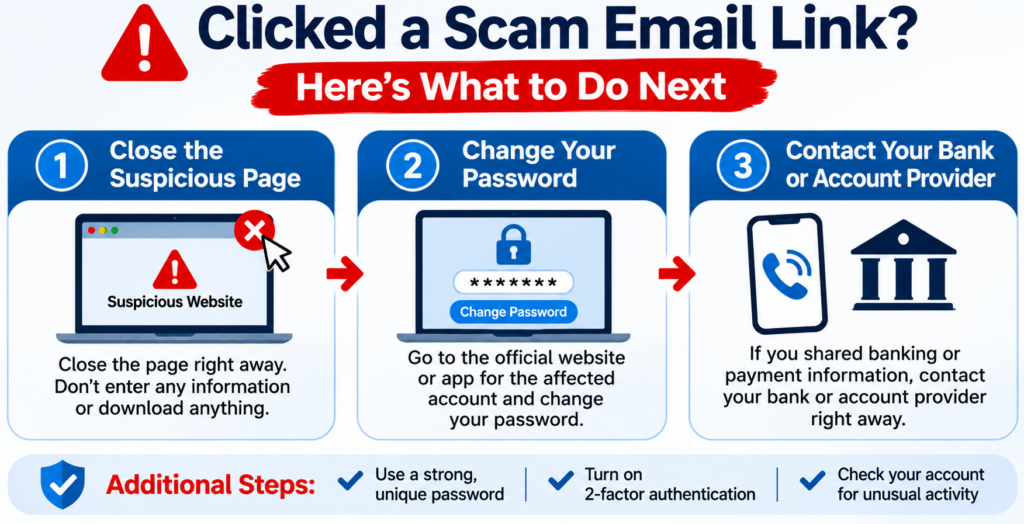
If you clicked but didn’t enter information
- Close the suspicious page.
- Don’t download anything or grant permissions.
- Make sure your browser, operating system, and security software are updated.
- Run a security scan if you downloaded or opened anything suspicious.
Clicking a link doesn’t automatically mean your account has been stolen, but it can expose you to harmful websites or downloads.
If you entered your password
- Go directly to the real website or app.
- Change the affected account’s password immediately.
- Change passwords on other accounts if you reused that password.
- Enable two-factor authentication.
- Review account activity and recovery settings for unfamiliar changes.
If you provided banking or credit card information
Contact your bank or card issuer immediately using its official number.
Explain what happened and follow its instructions for protecting your accounts.
If you provided sensitive identity information
Visit IdentityTheft.gov for a recovery plan based on the information you shared.
What If an Email Looks Completely Legitimate?
Not every scam email contains obvious spelling mistakes, strange formatting, or suspicious logos.
Some are nearly identical to legitimate business emails.
If a message asks you to transfer money, share private information, sign in through a link, or download an unexpected attachment, verify it independently even if it looks professional.
Remember: A familiar logo, correct spelling, or an email that addresses you by name doesn’t prove the sender is trustworthy.
How to Protect Yourself From Future Email Scams
A few simple habits can reduce your risk:
- Enable two-factor authentication on important accounts.
- Use a different strong password for each account.
- Keep your phone and computer updated.
- Use your email provider’s spam and phishing reporting tools.
- Verify unexpected requests independently.
- Avoid opening suspicious links and attachments.
You don’t need to be a technology expert to recognize many email scams. Developing a habit of checking unexpected requests is one of the most useful steps you can take.
Frequently Asked Questions
How can I tell if an email is a scam?
Check the sender’s address, unexpected requests for personal information, urgent threats, suspicious links, and unusual attachments. Verify the message through the company’s official website or app.
Can scam emails look real?
Yes. Scam emails can use genuine-looking logos, professional writing, and familiar company names. Appearance alone doesn’t prove a message is legitimate.
Is it dangerous just to open a scam email?
Simply viewing an email is generally less risky than clicking links, opening attachments, or entering information. However, some messages can load tracking content, and software vulnerabilities can create additional risks. Keep your email app and device updated.
Can a scam email come from someone I know?
Yes. Scammers may impersonate a familiar person or use a compromised email account. Verify unexpected requests through another trusted communication method.
Should I reply to a suspicious email?
No. Replying can encourage further contact. Report the message and delete it instead.
What is the difference between spam and phishing?
Spam generally means unwanted bulk messages. Phishing is an attempt to deceive you into revealing information, sending money, or taking another harmful action. A phishing email may also be classified as spam.
Can Gmail automatically detect scam emails?
Gmail includes spam and phishing protection, but no filtering system catches every scam. You should still examine unexpected messages carefully.
Final Thoughts
Learning how to tell if an email is a scam is an important part of staying safe online.
Remember these seven warning signs: suspicious senders, urgent threats, requests for personal information, questionable links, unexpected attachments, unbelievable offers, and unusual messages.
If something doesn’t feel right, don’t click. Verify the request through a trusted source.
A few extra moments of caution can help protect your money, personal information, and online accounts.
Related DailyTechHelp.com articles:
- How to Stop Spam Emails in Gmail (Easy Step-by-Step Guide)
- Why Are My Emails Going to Spam in Gmail? (And How to Fix It)
Sources and further reading: